DSE practice for three roles, designed and shipped from the repo
I led design on Hanlun’s platform for Hong Kong’s DSE exam, for students, teachers and school admins, and built much of its interface myself: first a clickable prototype, then components and screens in the production codebase.
Hanlun e-Learning Center prepares secondary students for the DSE, the exam that decides university places in Hong Kong. Students follow a learning path of lessons and quizzes and sit past and mock papers, writing Paper 1 by hand on screen; teachers mark, set pass rates and follow progress; admins run the schools, the curriculum and the papers.
I worked with the team’s developers, tech lead and PM. I built the prototype from December 2025, then worked in the production repo alongside the developers from February 2026, mostly on the student and teacher apps and their Storybook.
One paper, three roles
A DSE maths paper comes in two parts. Paper 1 is long answers, written by hand; Paper 2 is multiple choice. On the platform an admin publishes the paper, the student sits both parts, marks Paper 1 against the marking scheme, and the teacher marks it again. The results feed the progress the teacher follows for each student. I designed all three sides.
Three things the design held to
The real paper, on screen.
Questions in real maths notation, answers handwritten on lined sheets, and self-grading in the marking scheme’s own terms of method and answer marks.
Learn the data before the student screens.
We started on the student side. About a month in, I switched to the teacher and admin side so the team could see how the backend and data fit together, then came back to the students with that in hand.
Ship the UI, not a picture of it.
The prototype was a working site, not a picture. In production, components and their states live in Storybook, and I opened design PRs for UI changes myself.
Sitting a paper, then marking it
Led design · built the screens in codePaper 1 had to feel like the exam paper: handwriting on lined sheets, maths that looks printed, nothing lost when a student stops halfway. Then, before a teacher sees it, the student marks it.
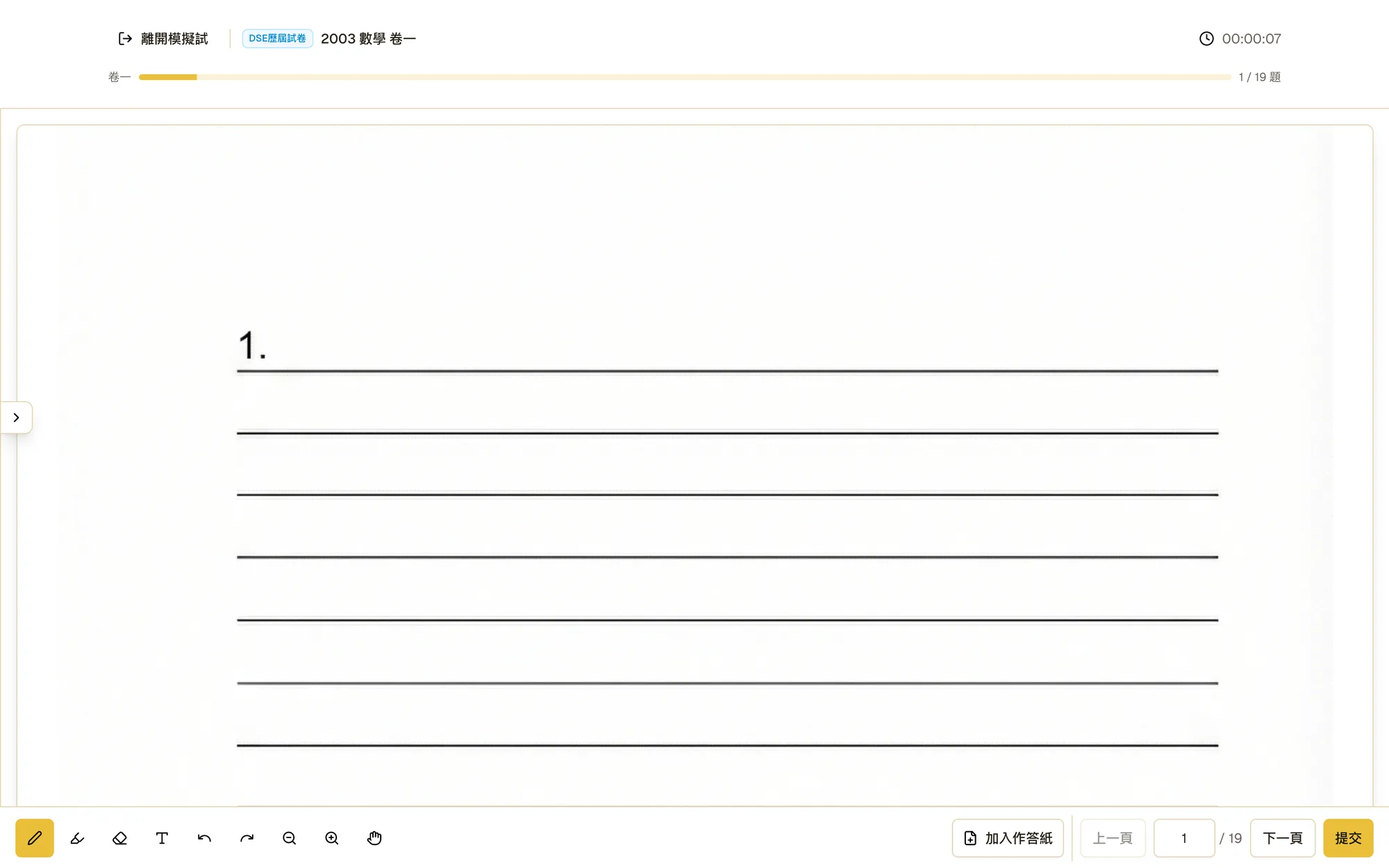
A canvas that inks for a pen or mouse, not a palm
Answers are written on lined sheets with pen, highlighter, eraser and text tools, and Add Answer Sheet gives a question more room. A mouse or pen inks; a bare finger or a resting palm doesn’t. iPads need one more step in the device’s own settings, so on iPad a dismissible reminder asks students to turn on Only Draw with Apple Pencil and turn off Scribble. Work saves as they go, with the save time in the bottom bar. Leaving mid-paper says so, and coming back from the scoreboard returns the answers and the clock where they stopped.
7. Solve x2 − 5x + 6 = 0. (3 marks)
1 / 7Paper 1 is answered by hand, on lined answer sheets inside the paper.
Maths that looks like the printed paper
DSE maths is full of fractions, roots and powers. Flattened to plain text, the on-screen paper stops looking like the one the student will sit. Questions and answer options render real notation from LaTeX, which I set up in the prototype and documented there for whoever writes the questions.
x = (-b +/- sqrt(b^2 - 4ac)) / 2aMarking yourself before the teacher does
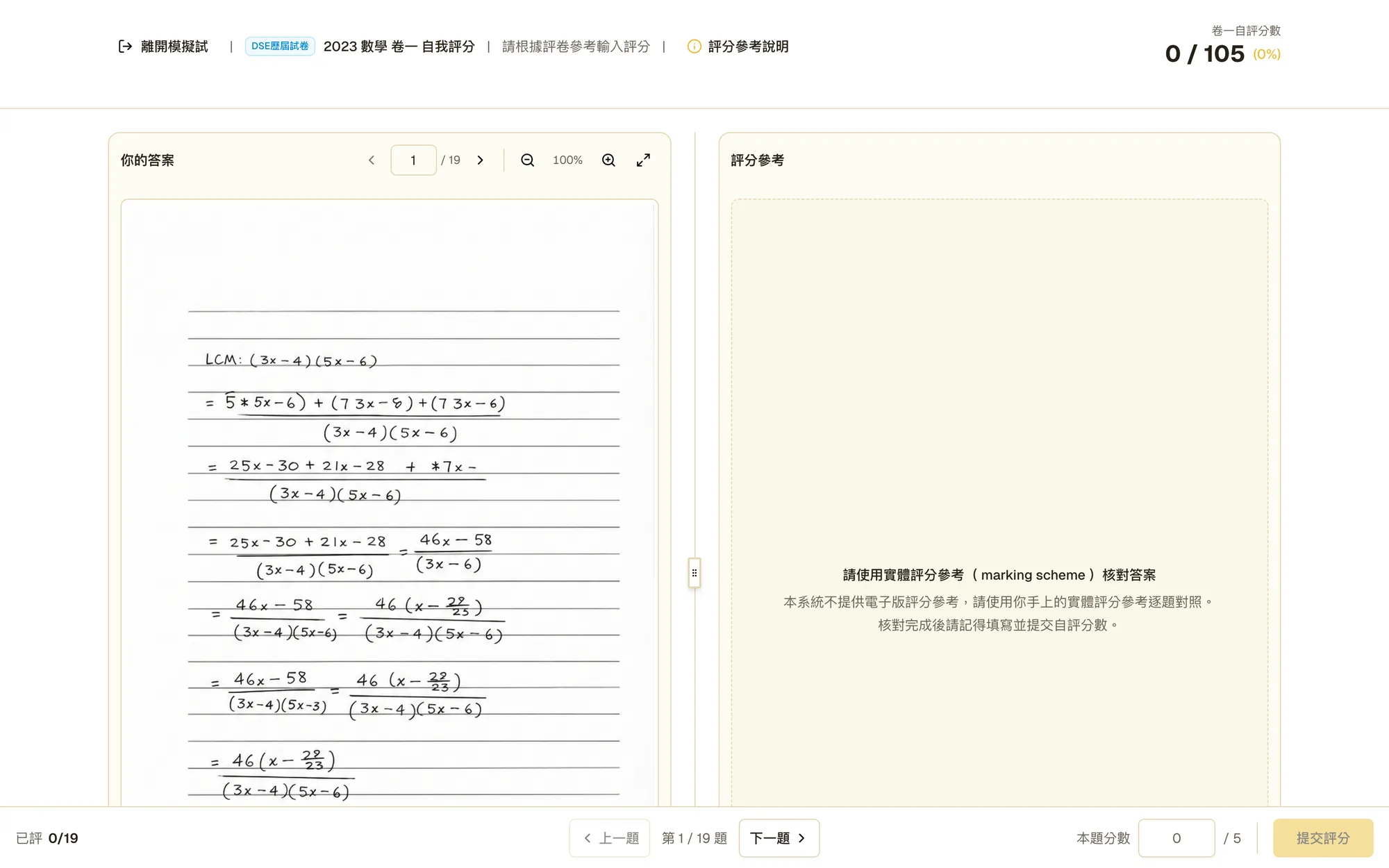
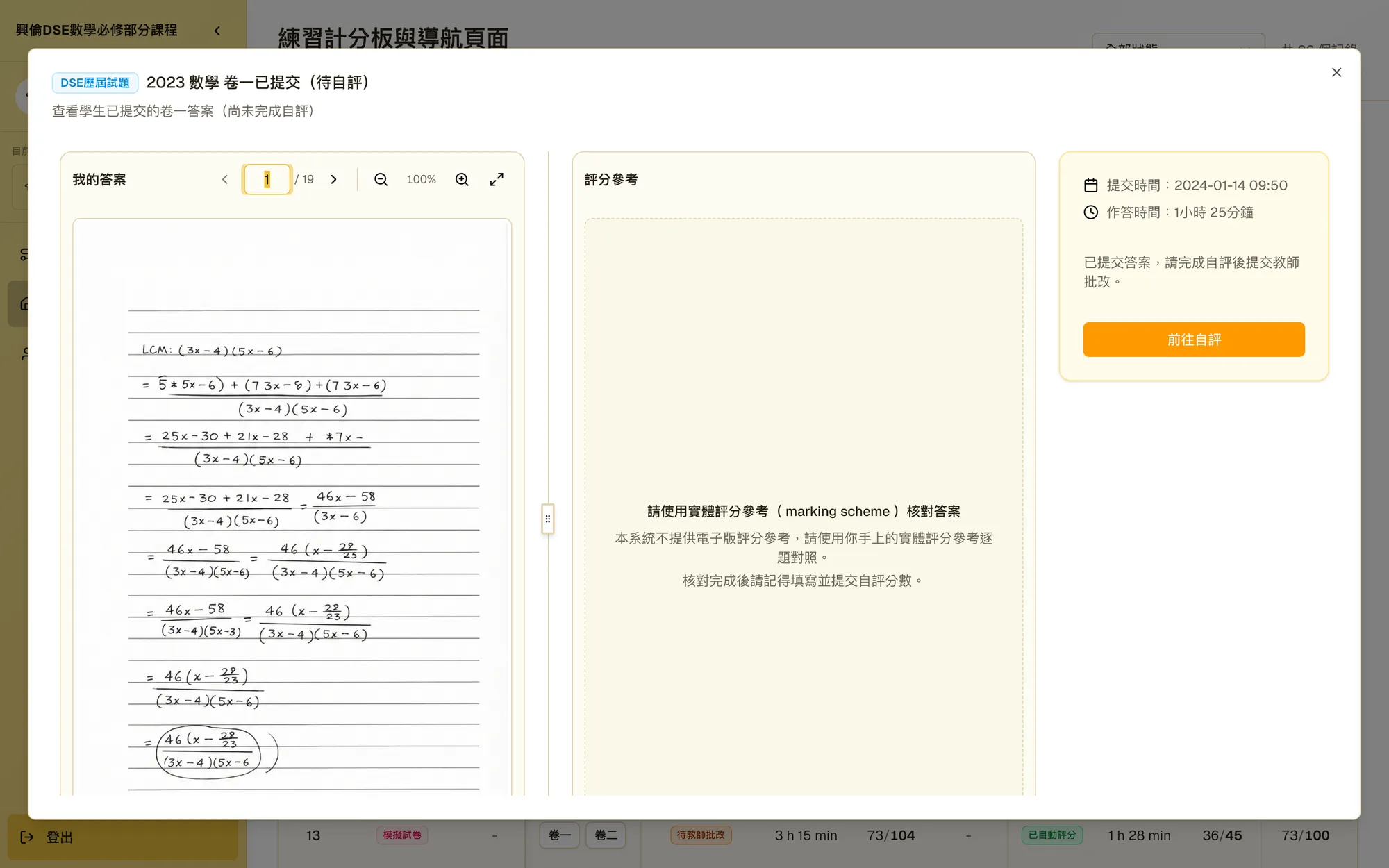
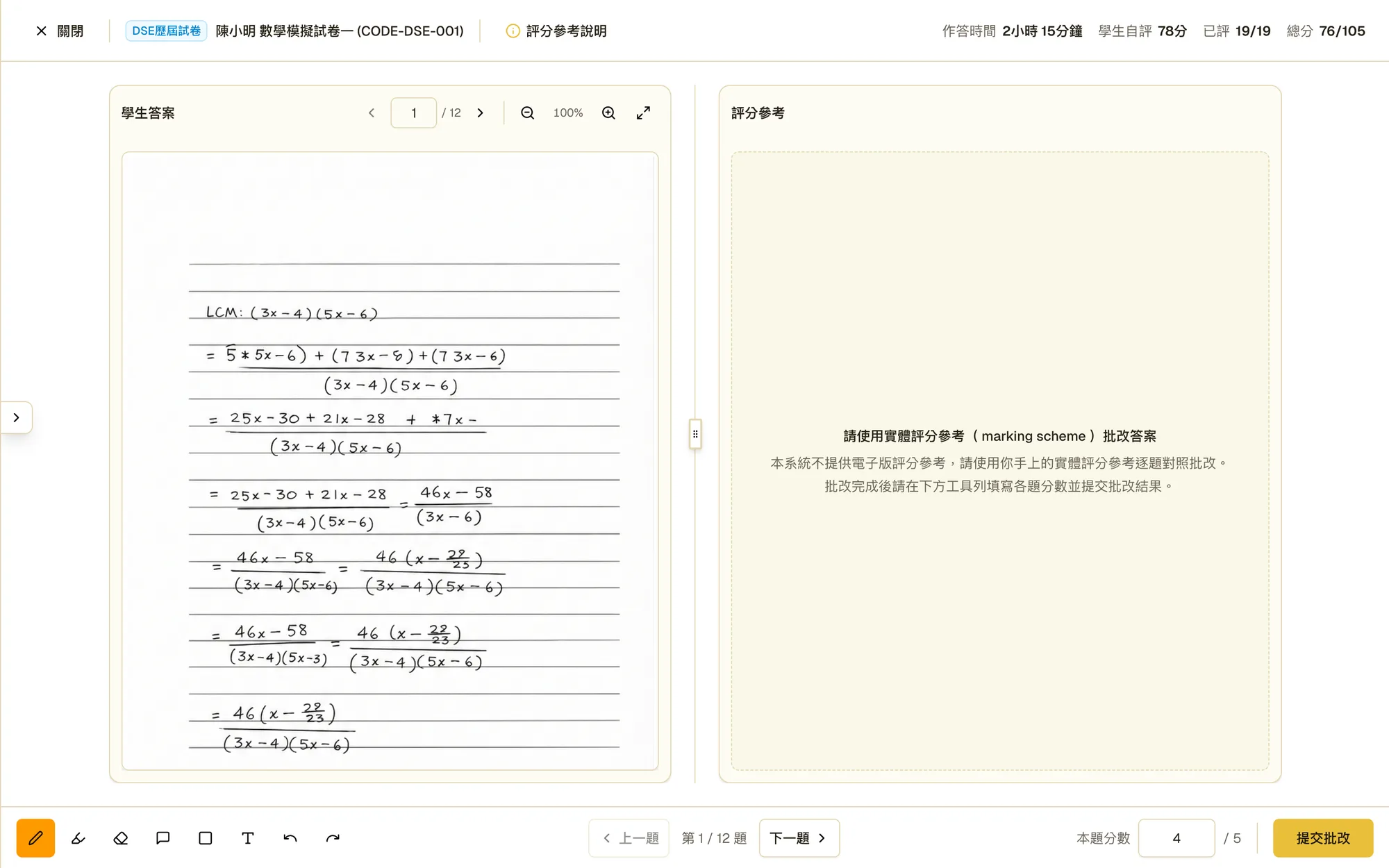
After submitting Paper 1, the student goes through it question by question and enters a score for each. Hanlun’s own mock papers show the marking scheme beside the answer. DSE past papers have no electronic scheme in the system, so the panel says to use the printed copy instead. A marking scheme description explains method and answer marks the way the printed scheme does. Before anything is sent, the next steps are spelled out; for a self-taught student with no teacher, the self score becomes the Paper 1 result.
This system does not provide electronic marking scheme. Please use your physical marking scheme to check your answers.
After checking, please remember to fill in and submit your self-grading score.
1 / 6A DSE past paper has no electronic marking scheme, so the panel asks the student to check against their printed copy.
Marking, pass rates and what sits behind them
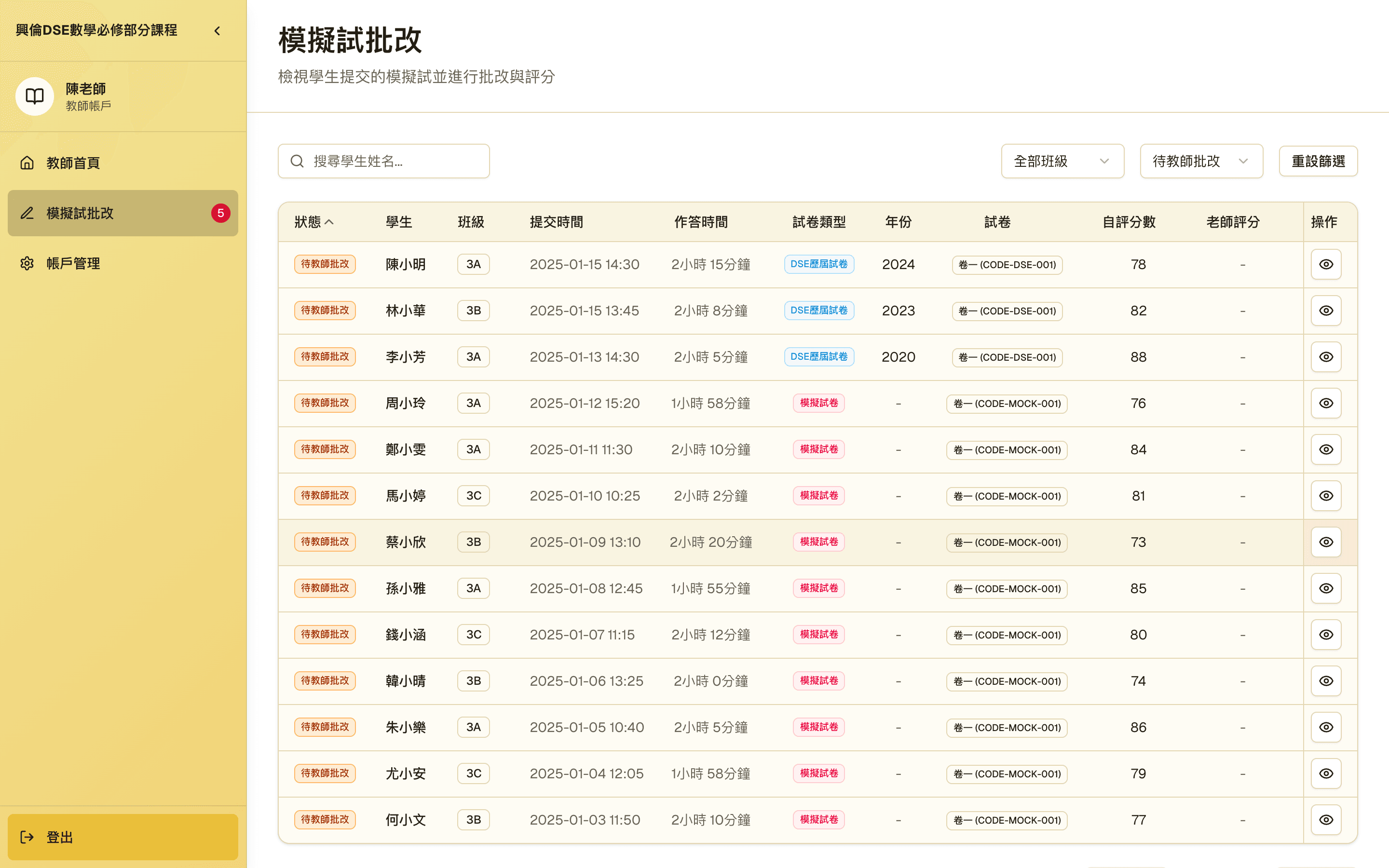
Led design · built the teacher screens in codeTeachers mark what students have self-graded and follow progress student by student; admins run the schools, the curriculum and the papers. About a month in, I moved to this side to learn how the data fits together, then went back to the student screens.
Two papers, two ways of scoring, one record
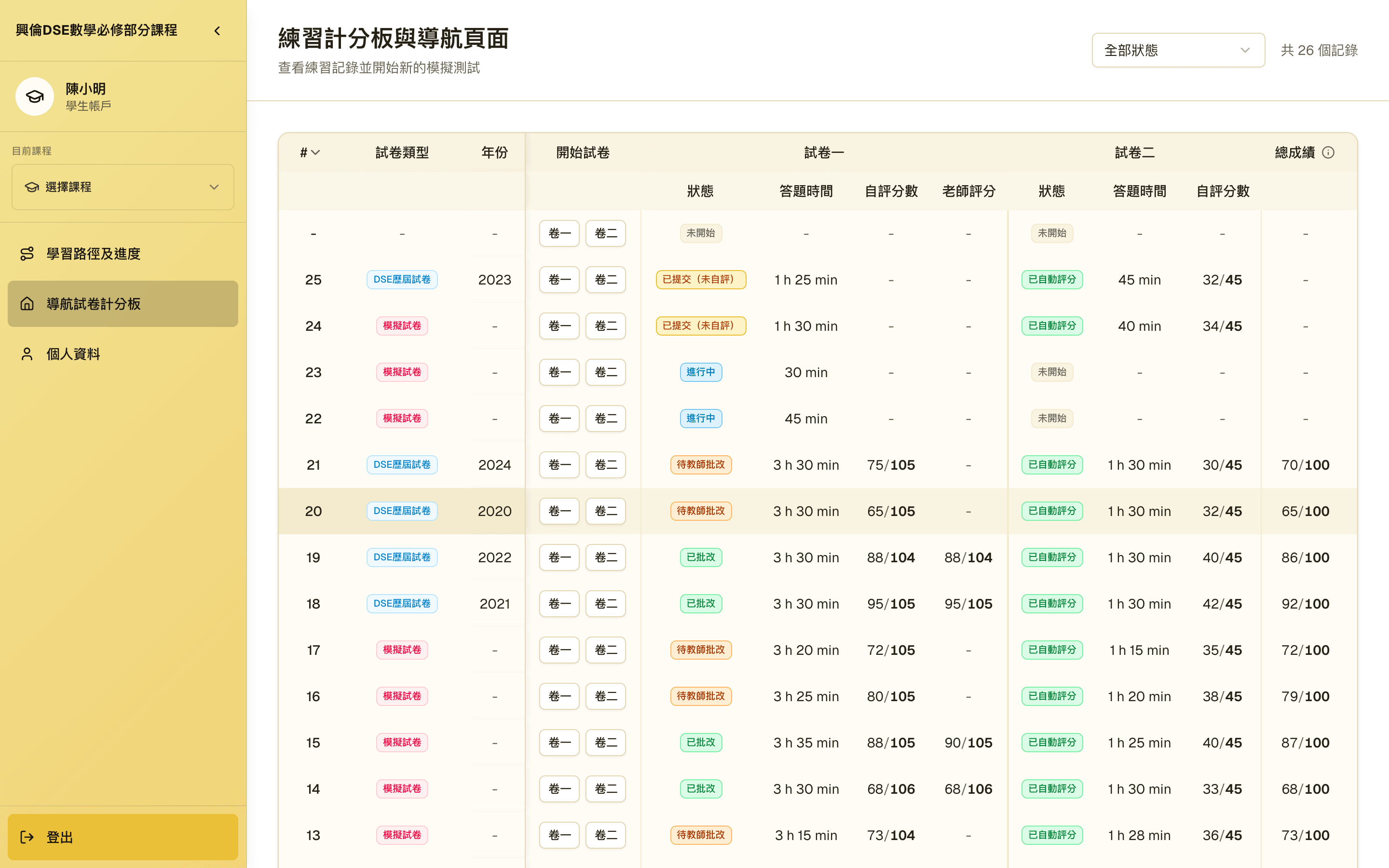
Each attempt holds both papers. Paper 2 grades itself. Paper 1 goes from In Progress, through an upload, to Submitted (No Self-Eval), to Pending Teacher Review once the student has self-graded, to Graded when the teacher is done, and the scoreboard keeps both scores side by side. Teachers mark from an inbox; their marking saves as a draft, and once a grading is submitted, the browser’s back button can’t reopen it for a second pass.
| Paper | Paper 1 | Paper 2 | |||||
|---|---|---|---|---|---|---|---|
| Status | Time spent | Self score | Teacher score | Status | Time spent | Score | |
| DSE Past Paper 2023 | Not Started | – | – | – | Not Started | – | – |
| DSE Past Paper 2022 | Graded | 3 h 30 min | 88/104 | 88/104 | Auto-Graded | 1 h 30 min | 40/45 |
One attempt holds both papers. Nothing has started.
A pass rate that doesn’t rewrite the past
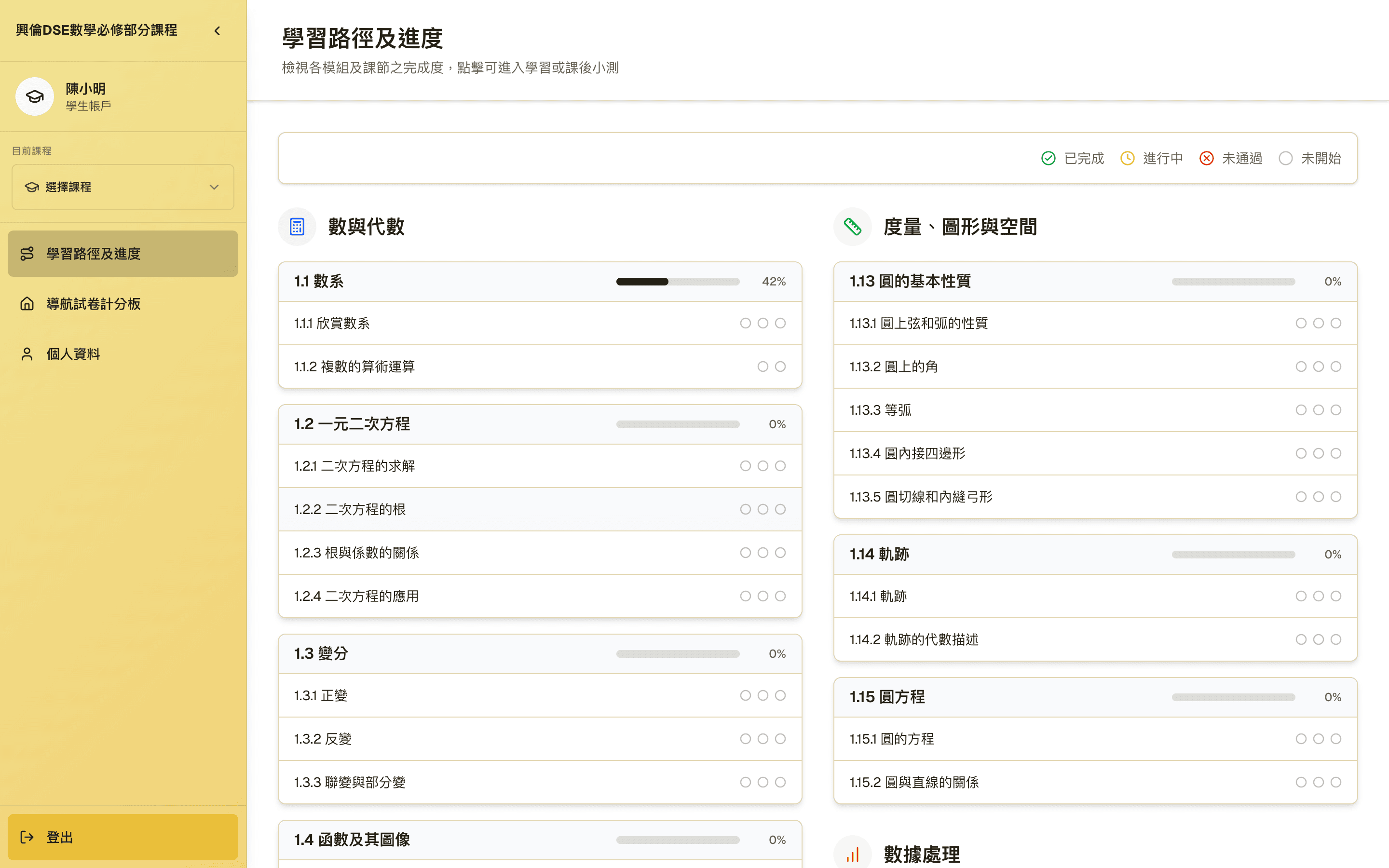
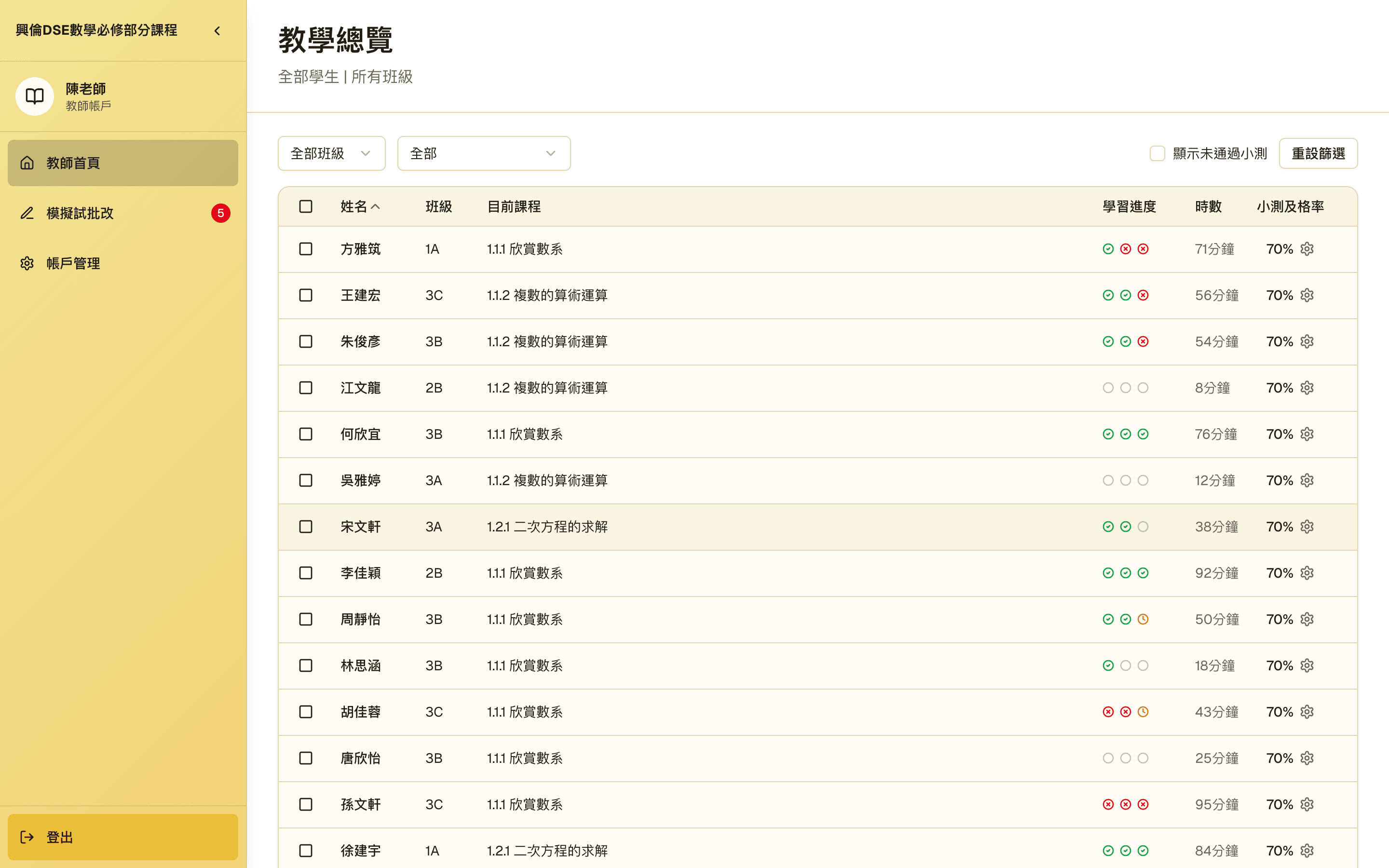
Every lesson ends with a post-lesson quiz, and the lesson card keeps three slots for attempts: a lesson completes on a pass, or after three tries. Teachers set the quiz pass rate per student or for a batch. A new rate applies to future attempts only, so earlier attempts keep their result and every record shows the passing rate it was judged at. Another engineer built that snapshot in the backend; I exposed its result through the API and into the student and teacher screens.
Open the settings to change Student A’s pass rate. Batch setting works the same way for selected students.
- Attempt 16/10(60%)Passing rate: 70%Not passed
1 / 5Each lesson ends with a post-lesson quiz. The lesson card keeps three slots for attempts.
Learning the data model
Admins run three things: a curriculum per course, versioned so a draft can be previewed before students see it; paper sets, each a DSE past paper or a mock paper with its two papers; and schools, with teachers and students imported in bulk. Working through the teacher and admin side meant that, back on the student screens, I was drawing on top of the real structure rather than guessing at it.
From prototype to production code
Prototype · Storybook · design PRsI still designed in Figma first. But the prototype was a working site I built, and much of what shipped I built in the production repo, next to the developers.
Three of those merged changes, with their tests and review notes, are in the implementation story (opens the Engineering).
How a design reached the codebase
A new feature went from Figma to the prototype and then to the developers; I then built its UI and states in Storybook and opened a design PR for them to merge. A change to something already built skipped the handover: I iterated on the mockup site with Cursor and opened a design PR that a developer merged.
- MeDesignflows and screens in Figma
- MePrototypea working mockup site, built with Cursor
- DevelopersBuilddevelopers build the feature and data
- MeComponentsI build the UI and its states in Storybook
- MeDesign PRopened by me, merged by a developer
4 of 5 steps are mine, and the handoff is a pull request, not a file.
Every state, named
Components live in Storybook with each state as its own story. Two toolbars switch the subject theme (maths gold, physics red, chemistry blue, biology green, a colour system I added) and the language, Traditional Chinese or English, so a layout that breaks in English or in another subject’s colour shows up before it ships.
status: "pending_review"theme: "subject-theme-math"Each state is its own story; the toolbars switch subject colour and language, so a layout that breaks in English or in physics red shows up before it ships.
What I put into the repo
Most of my commits are screens and components, but the ones I’d point a design lead to are the rules, the device fixes and the language work: decisions that only exist once they’re in the code.
The pieces every screen is built from, with their tokens and stories.
0d02d9202/06finalize StatusTag component with serif font and refined colors4757d1902/13Submission confirmation UI and design tokens naminga57954004/17webAdd Paper1 fullscreen view and shared marking toolbar61c0a1a07/21web, dbAdd subject-based brand color themes9c64d2207/31webAdd status-error and status-submitting tokens for exam PDF status chips
Real commit subjects from my history, ticket numbers removed. Outlined days are when this kind landed; hover a line to find its day.
From a prototype to the production codebase
- Prototype
- A clickable site for all three roles, built from December 2025.
- Order
- Student screens first, then the teacher and admin side to learn the data model, then back to students.
- Build
- In the production repo from February 2026, alongside two developers and a tech lead.
- Now
- In active iteration in the production repo.
- Role
- Senior UI/UX Designer, Oursky. Led design.
- Client
- Hanlun e-Learning Center
- Dates
- 2025–now
- Platform
- Web, desktop
- iPad
- Team
- 1Designer
- 2Developers
- 1Tech lead
- 1PM
- Built with
- Figma; a Next.js prototype; React, shadcn/ui and Storybook in production; Cursor
- Audience
- Hong Kong secondary schools: students, teachers and school admins
What I learnedA pass rate looks like a setting, but it is part of the record. Once teachers could change it, every attempt had to keep the rate it was judged at.